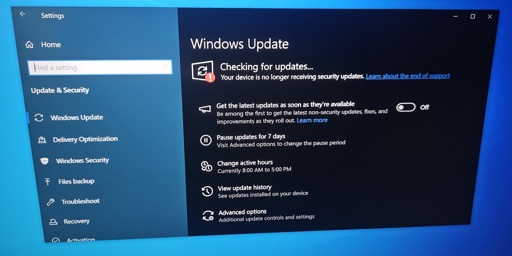
for anyone afraid to make the jump to linux do it, now is the time. especially if you have an amd gpu unless you absolutely need software/games that does not support linux (and I dont mean the millions of windows games proton supports effortlessly, just a handful with kernel ac, and some pro software)
too daunting to research and learn? try in a vm and use llms to help you understand how things work
took me a week to get comfortable in arch linux after around two decades of windows

WINDOWS MENTIONED.
#!/bin/bash
DEPLOY LINUX ARMY
Damn, that sucks. When does my Arch support end?
Nuance
Okay if you wanna get technical, some folks define support as meaning some sort of official paid support process, in which case there is none at all. But I feel like a funnier joke would be that Arch “support” lasts until there’s any sort of update to any package you have.
I’m migrate my notebook to Linix Mint, perform way better than Windows 10.
I’m trying to figure out a way to transport my modlists from MO2 in Fallout New Vegas and Skyrim to run on Linux, once this is done, i goodbye windows forever on my personal devices
If only there were some kind of alternative… I would call it “Linux”
Use Linux, get freedom
Get off American monopoly tech. The desktop is the easiest.
A GNU/Linux desktop has endless advantages and doesn’t include the anti-features.
Linux, in some form, runs a lot of your life already, even if you don’t know it.
If your a tech, you really should deeply know Linux/UNIX anyway.
The entire article is based on a false premise:
With ESU, you can still get security updates and minor fixes or improvements, but the catch is that extended support ends on October 13, 2026.
Not true, there are three years of ESU updates available.
Do you have a source for that? Everything including Microsoft itself I find tells me that free ESU support for private users will end in Oct 26. Do you mean some paid feature for companies or so?
You can activate 3 years of updates for free with Microsoft Activation Scripts: https://massgrave.dev/windows10_eol
You are talking about the business extension that was already available everywhere, but it requires buying it. I haven’t looked into it but I haven’t seen anything saying it was free. The article is talking about Germany and the free version that Europe forced Microsoft to enable for everyone, even without a subscription - but only in Europe. That one is only one year.
The link I shared contains steps to activate the 3-year extension for free, on a non-business computer. I don’t care if this extension is marketed towards business accounts. You can activate all 3 years on your personal computer for free.
Piracy is usually free yeah but that really doesn’t count.
I honestly think it’s a bit of a stretch to call it piracy when the open-source code is hosted on Microsoft-owned Github, and Microsoft support has been caught using it themselves: https://www.bleepingcomputer.com/news/security/microsoft-support-cracks-windows-for-customer-after-activation-fails/
I just know they said from the start that you could buy three years at escalating prices. Then later, closer to the original end of support they made the first year of ESU free for users in the EEA, and then they made it buy-able for reward points or something like that for everyone.
tells me that free ESU support for private users will end in Oct 26
You’re probably right on that
With how Microsoft are handling updates lately, no longer getting them might actually be a selling point
Honestly, its like they are fighting to drown the company. Microslop.
Eight months to learn Linux is a LONG time. You’ll be fine.
Time to switch to linux, then.
Never went with Win 11. Tried jump to Linux, played with it for a week I believe, quite recently. Tinkering aside (mostly due to learning so not so bad, last distro change I got it all up to where I wanted it within an hour after install, because I finally knew what I was doin xD) my main problem is that Linux doesn’t really use my specs well.
I have an older system and on Windows, I can punch above my league with running shit like Hogwarts Legacy or Fallout 76 on my i5-4460 and GTX 750, while on Mint, CachyOS and Nobara Fallout 76 struggled hard to run fluidly, liked to flicker and freeze, and Hogwarts Legacy couldn’t even get into menu. And I am not really willing to give up on these two for now.
But other than that I found that no matter the distro, shit just…works. The worst part I think was that drivers for my old GPU are shitty on linux, but if you have in hardware from the last decade, I’d say just try it. All apps and shit you need is mostly handled by package repositories (something like app stores) and if your software isn’t there, check it’s website, maybe they have .deb or .rpm packages which are pretty much Linux .exe files. Or a simple command to download it via terminal.
I have old Brother printer and even tho Linux community labels it papwerweight, Brother actually has full drivers for linux installed via copy-paste commands they give you on their website. With full instructions how to do it step by step. So really, if you didn’t try it yet, consider.
If you haven’t tried it, give Bazzite a shot. Been running it for a year or so at this point, minimal complaints and it runs like a champ with minimal issues and the GPU drivers are built into the image. Might be worth a shot to see if it helps your rig run better
My hardware (GPU) is literally too old and unsupported according to Bazzite itself xD
My experience has been the same. As a software engineer who used Linux throughout university, I just can’t enjoy having a lousy experience with poor performance, constant tinkering, limited software and constant bugs. I can’t even adjust the DPI scale of an external monitor on Ubuntu without the entire windowing system going haywire.
I guess I’m just too old to have the patience to try to fix that kind of stuff by hand, and I thought I’d never say it, but I just like Windows 11. It works. Sue me.
virii still work w/o upgrade
Thats some actually great news!
Removed by mod
I tried Mint about a year ago, and one of the things I really didn’t like was having to get my software from some appstore. It seemed very limited. I’d much rather just be able to download an executable and install it that way. Feels like I have more control over what I can actually use my pc for.
There are like 15 ways to install software in Mint. The app store is just for people who don’t like to Google or who are scared of breaking something
In that case people are shit at explaining it. I tried googling it back then, and all I could get was dumb answers that didn’t actually give an answer to the questions.
You can with mint tho? You don’t have to use the app store
…hey, I’m a newb to Linux but I tried Mint and don’t they have like two-three app managers plus they can install .deb files? Like, .deb and .rpm are basically Linux take on .exe installers.
That comes from using Linux for, overall, a week.
Mint can install from the appstore, or a user can install .deb files (since it’s Debian based) they download from the web. It’s also compatible with Flatpak files or Appimage files.
It cannot use .rpm files. Those are only compatible with Fedora, openSUSE, Redhat, and a handful of others.
Removed by mod